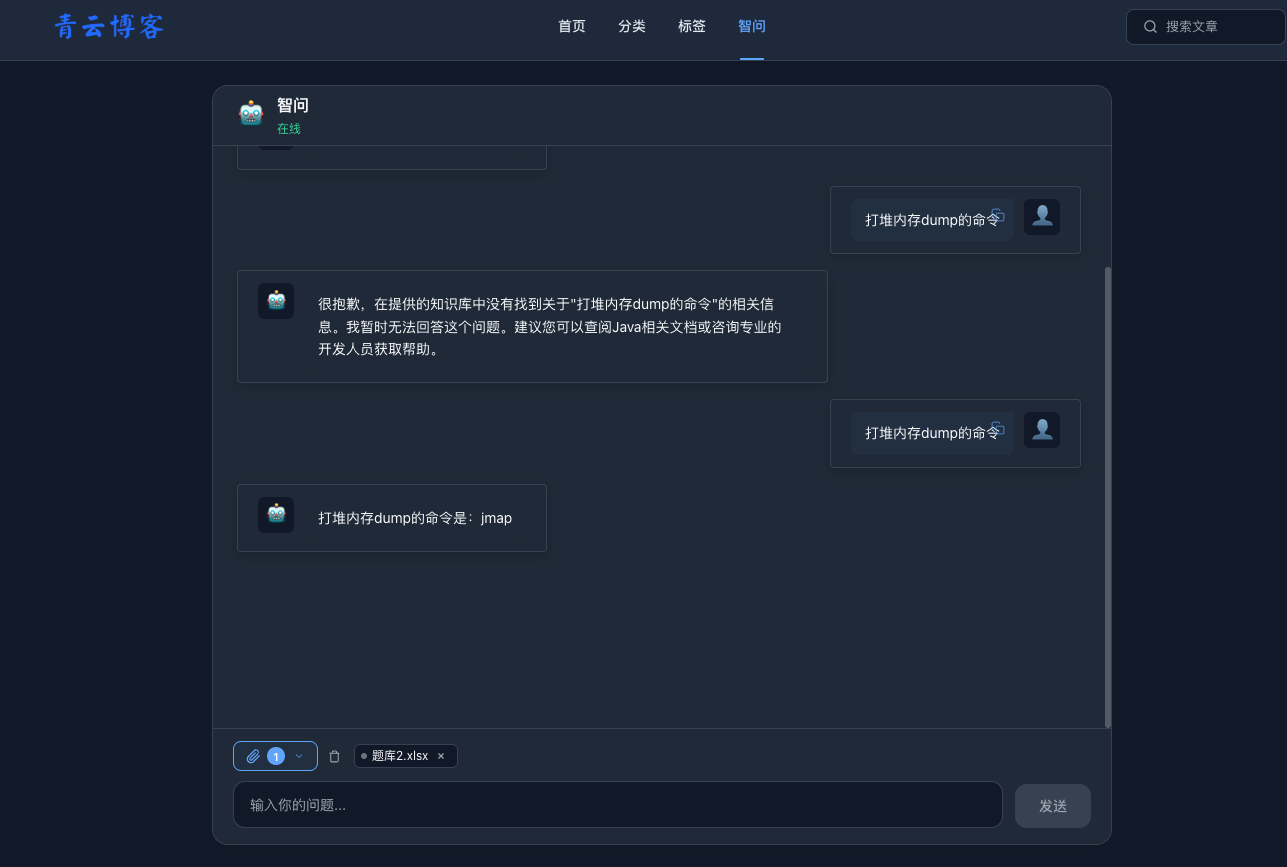
说明:本章节是对Spring Ai Alibaba本地知识库检索的实践,包含知识库文档上传、向量数据库存储、向量数据库检索三个核心功能。
一、官网
相关的RAG文档:
二、核心代码
1.maven依赖
<?xml version="1.0" encoding="UTF-8"?>
<project xmlns="http://maven.apache.org/POM/4.0.0"
         xmlns:xsi="http://www.w3.org/2001/XMLSchema-instance"
         xsi:schemaLocation="http://maven.apache.org/POM/4.0.0 https://maven.apache.org/xsd/maven-4.0.0.xsd">
    <modelVersion>4.0.0</modelVersion>

    <parent>
        <groupId>org.springframework.boot</groupId>
        <artifactId>spring-boot-starter-parent</artifactId>
        <version>3.5.14</version>
        <relativePath/>
    </parent>

    <groupId>com.ai</groupId>
    <artifactId>ai-blog</artifactId>
    <version>1.0.0</version>
    <name>ai-blog</name>
    <description>AI Blog System</description>

    <properties>
        <java.version>17</java.version>
        <mybatis-plus.version>3.5.5</mybatis-plus.version>
        <jjwt.version>0.12.5</jjwt.version>
        <hutool.version>5.8.28</hutool.version>
        <mapstruct.version>1.5.5.Final</mapstruct.version>
        <springdoc.version>2.8.9</springdoc.version>
        <graalvm.polyglot.version>24.2.1</graalvm.polyglot.version>
    </properties>

    <dependencyManagement>
        <dependencies>
            <dependency>
                <groupId>com.alibaba.cloud.ai</groupId>
                <artifactId>spring-ai-alibaba-bom</artifactId>
                <version>1.1.2.0</version>
                <type>pom</type>
                <scope>import</scope>
            </dependency>
            <dependency>
                <groupId>org.springframework.ai</groupId>
                <artifactId>spring-ai-bom</artifactId>
                <version>1.1.4</version>
                <type>pom</type>
                <scope>import</scope>
            </dependency>
            <dependency>
                <groupId>com.alibaba.cloud.ai</groupId>
                <artifactId>spring-ai-alibaba-extensions-bom</artifactId>
                <version>1.1.2.1</version>
                <type>pom</type>
                <scope>import</scope>
            </dependency>
        </dependencies>
    </dependencyManagement>

    <repositories>
        <repository>
            <id>central</id>
            <url>https://repo.maven.apache.org/maven2</url>
        </repository>
    </repositories>
    <dependencies>
        <!-- Spring Boot Web -->
        <dependency>
            <groupId>org.springframework.boot</groupId>
            <artifactId>spring-boot-starter-web</artifactId>
        </dependency>

        <!-- Spring Security -->
        <dependency>
            <groupId>org.springframework.boot</groupId>
            <artifactId>spring-boot-starter-security</artifactId>
        </dependency>

        <!-- Spring Boot AOP -->
        <dependency>
            <groupId>org.springframework.boot</groupId>
            <artifactId>spring-boot-starter-aop</artifactId>
        </dependency>

        <!-- Spring Data Redis -->
        <dependency>
            <groupId>org.springframework.boot</groupId>
            <artifactId>spring-boot-starter-data-redis</artifactId>
        </dependency>

        <!-- Validation -->
        <dependency>
            <groupId>org.springframework.boot</groupId>
            <artifactId>spring-boot-starter-validation</artifactId>
        </dependency>

        <!-- MyBatis Plus -->
        <dependency>
            <groupId>com.baomidou</groupId>
            <artifactId>mybatis-plus-spring-boot3-starter</artifactId>
            <version>${mybatis-plus.version}</version>
        </dependency>

        <!-- MySQL -->
        <dependency>
            <groupId>com.mysql</groupId>
            <artifactId>mysql-connector-j</artifactId>
            <scope>runtime</scope>
        </dependency>

        <!-- JWT -->
        <dependency>
            <groupId>io.jsonwebtoken</groupId>
            <artifactId>jjwt-api</artifactId>
            <version>${jjwt.version}</version>
        </dependency>
        <dependency>
            <groupId>io.jsonwebtoken</groupId>
            <artifactId>jjwt-impl</artifactId>
            <version>${jjwt.version}</version>
            <scope>runtime</scope>
        </dependency>
        <dependency>
            <groupId>io.jsonwebtoken</groupId>
            <artifactId>jjwt-jackson</artifactId>
            <version>${jjwt.version}</version>
            <scope>runtime</scope>
        </dependency>

        <!-- Hutool -->
        <dependency>
            <groupId>cn.hutool</groupId>
            <artifactId>hutool-all</artifactId>
            <version>${hutool.version}</version>
        </dependency>

        <!-- MapStruct -->
        <dependency>
            <groupId>org.mapstruct</groupId>
            <artifactId>mapstruct</artifactId>
            <version>${mapstruct.version}</version>
        </dependency>
        <dependency>
            <groupId>org.mapstruct</groupId>
            <artifactId>mapstruct-processor</artifactId>
            <version>${mapstruct.version}</version>
            <scope>provided</scope>
        </dependency>

        <!-- SpringDoc OpenAPI (兼容 Spring Boot 3.5.x) -->
        <dependency>
            <groupId>org.springdoc</groupId>
            <artifactId>springdoc-openapi-starter-webmvc-ui</artifactId>
            <version>${springdoc.version}</version>
        </dependency>

        <!-- Knife4j OpenAPI3 UI (独立UI,兼容 springdoc 2.x) -->
        <dependency>
            <groupId>com.github.xiaoymin</groupId>
            <artifactId>knife4j-openapi3-ui</artifactId>
            <version>4.4.0</version>
        </dependency>

        <!-- Lombok -->
        <dependency>
            <groupId>org.projectlombok</groupId>
            <artifactId>lombok</artifactId>
        </dependency>

        <!-- Test -->
        <dependency>
            <groupId>org.springframework.boot</groupId>
            <artifactId>spring-boot-starter-test</artifactId>
            <scope>test</scope>
        </dependency>
        <dependency>
            <groupId>org.springframework.security</groupId>
            <artifactId>spring-security-test</artifactId>
            <scope>test</scope>
        </dependency>

        <!--spring ai alibaba-->
        <dependency>
            <groupId>com.alibaba.cloud.ai</groupId>
            <artifactId>spring-ai-alibaba-agent-framework</artifactId>
        </dependency>
        <dependency>
            <groupId>com.alibaba.cloud.ai</groupId>
            <artifactId>spring-ai-alibaba-starter-dashscope</artifactId>
        </dependency>

        <!--向量数据库支持-->
        <dependency>
            <groupId>org.springframework.ai</groupId>
            <artifactId>spring-ai-starter-vector-store-redis</artifactId>
        </dependency>

        <dependency>
            <groupId>org.springframework.ai</groupId>
            <artifactId>spring-ai-advisors-vector-store</artifactId>
        </dependency>

        <dependency>
            <groupId>org.springframework.ai</groupId>
            <artifactId>spring-ai-redis-store</artifactId>
        </dependency>

        <!--PoiDocumentReader 使用 Apache POI 库解析 Microsoft Office 文件,支持多种文件格式,包括:
            Word 文档:.doc, .docx
            PowerPoint 演示文稿:.ppt, .pptx
            Excel 电子表格:.xls, .xlsx-->
        <dependency>
            <groupId>com.alibaba.cloud.ai</groupId>
            <artifactId>spring-ai-alibaba-starter-document-reader-poi</artifactId>
        </dependency>

        <dependency>
            <groupId>org.springframework.ai</groupId>
            <artifactId>spring-ai-rag</artifactId>
        </dependency>


    </dependencies>

    <build>
        <plugins>
            <plugin>
                <groupId>org.apache.maven.plugins</groupId>
                <artifactId>maven-compiler-plugin</artifactId>
                <configuration>
                    <source>17</source>
                    <target>17</target>
                    <release>17</release>
                    <encoding>UTF-8</encoding>
                </configuration>
            </plugin>
            <plugin>
                <groupId>org.springframework.boot</groupId>
                <artifactId>spring-boot-maven-plugin</artifactId>
                <configuration>
                    <excludes>
                        <exclude>
                            <groupId>org.projectlombok</groupId>
                            <artifactId>lombok</artifactId>
                        </exclude>
                    </excludes>
                </configuration>
            </plugin>
        </plugins>
    </build>

</project>
说明:spring-ai-bom的版本原来按照官网是1.1.2,后面发现有bug升级到了1.1.4
2.yaml配置
server:
  port: 8080
  tomcat:
    uri-encoding: UTF-8
  servlet:
    encoding:
      charset: utf-8
      enabled: true
      force: true

spring:
  application:
    name: ai-blog
  profiles:
    active: dev
spring:
ai:
dashscope:
api-key: sk-09c7b571687b46d5a2e25a03fbddxxxx
chat:
options:
model: deepseek-r1
timeout: 60s
embedding:
options:
model: text-embedding-v3
vectorstore:
redis:
initialize-schema: true
index-name: custom-index
prefix: "custom-prefix:"
# 数据源配置
datasource:
driver-class-name: com.mysql.cj.jdbc.Driver
url: jdbc:mysql://xxxxxx:3306/ai_blog?useUnicode=true&characterEncoding=utf-8&useSSL=false&serverTimezone=Asia/Shanghai
username: root
password: xxxxx
# Redis配置
data:
redis:
host: 120.79.12.129
port: 6379
password: xxxxxxx
database: 0
timeout: 10s
# Jackson配置
jackson:
time-zone: GMT+8
date-format: yyyy-MM-dd HH:mm:ss
serialization:
write-dates-as-timestamps: false
# MyBatis-Plus配置
mybatis-plus:
mapper-locations: classpath*:/mapper/**/*.xml
type-aliases-package: com.ai.blog.entity
global-config:
db-config:
id-type: auto
logic-delete-field: deleted
logic-delete-value: 1
logic-not-delete-value: 0
configuration:
map-underscore-to-camel-case: true
cache-enabled: false
log-impl: org.apache.ibatis.logging.stdout.StdOutImpl
# JWT配置
jwt:
secret: mySecretKeyForJwtTokenGenerationAndValidation1234xxxxx
expiration: 1800000 # Token有效期:30分钟(毫秒)
renew-threshold: 900000 # 续期阈值:15分钟(毫秒),剩余时间小于此值时自动续期
header: Authorization
prefix: "Bearer "
# 日志配置
logging:
level:
com.ai.blog: debug
com.ai.blog.mapper: debug
# 文件上传配置
file:
upload:
path: ./uploads
allowed-types: jpg, jpeg, png, gif, bmp, webp, pdf, doc, docx, xls, xlsx
max-size: 10485760 # 10MB
access-path: /files
# SpringDoc配置
springdoc:
api-docs:
path: /v3/api-docs
swagger-ui:
path: /swagger-ui.html3.配置类
package com.ai.blog.config;

import lombok.extern.slf4j.Slf4j;
import org.springframework.ai.embedding.EmbeddingModel;
import org.springframework.ai.embedding.TokenCountBatchingStrategy;
import org.springframework.ai.vectorstore.VectorStore;
import org.springframework.ai.vectorstore.redis.RedisVectorStore;
import org.springframework.beans.factory.annotation.Value;
import org.springframework.context.annotation.Bean;
import org.springframework.context.annotation.Configuration;
import redis.clients.jedis.DefaultJedisClientConfig;
import redis.clients.jedis.HostAndPort;
import redis.clients.jedis.JedisPooled;

@Slf4j
@Configuration
public class VectorStoreConfig {

    @Value("${spring.data.redis.host:localhost}")
    private String redisHost;

    @Value("${spring.data.redis.port:6379}")
    private int redisPort;

    @Value("${spring.data.redis.password:}")
    private String redisPassword;

    @Value("${spring.data.redis.database:0}")
    private int redisDatabase;

    @Value("${spring.ai.vectorstore.redis.index-name:custom-index}")
    private String indexName;

    @Value("${spring.ai.vectorstore.redis.prefix:custom-prefix:}")
    private String prefix;

    @Bean
    public JedisPooled jedisPooled() {
        HostAndPort hap = new HostAndPort(redisHost, redisPort);
        DefaultJedisClientConfig clientConfig = DefaultJedisClientConfig.builder()
                .password(redisPassword)
                .database(redisDatabase)
                .timeoutMillis(5000)
                .build();
        return new JedisPooled(hap, clientConfig);
    }

    @Bean
    public VectorStore vectorStore(JedisPooled jedisPooled, EmbeddingModel embeddingModel) {
        return RedisVectorStore.builder(jedisPooled, embeddingModel)
                .indexName(indexName)
                .prefix(prefix)
                .metadataFields(
                        RedisVectorStore.MetadataField.tag("source"))
                .initializeSchema(true)
                .batchingStrategy(new TokenCountBatchingStrategy())
                .build();
    }
}
4.上传知识库
@Override
@Transactional
public DocumentResponse uploadDocument(MultipartFile file, String description, String tags) {
    if (file == null || file.isEmpty()) {
        throw new BusinessException(ErrorCode.FILE_UPLOAD_FAILED, "上传文件不能为空");
    }

    // 检查文件大小
    if (file.getSize() > properties.getMaxSize()) {
        throw new BusinessException(ErrorCode.FILE_SIZE_EXCEEDED,
                "文件大小超出限制,最大允许 " + (properties.getMaxSize() / 1024 / 1024) + "MB");
    }

    // 获取文件扩展名
    String originalFilename = file.getOriginalFilename();
    String extension = getFileExtension(originalFilename);

    // 检查文件类型
    if (!isAllowedType(extension)) {
        throw new BusinessException(ErrorCode.FILE_TYPE_NOT_ALLOWED,
                "文件类型不允许,支持的类型: " + Arrays.toString(DOC_ALLOWED_TYPES));
    }

    // 生成唯一文件名
    String uuid = UUID.randomUUID().toString().replace("-", "");
    String newFileName = generateFileName(uuid,extension);

    // 生成日期目录
    String datePath = LocalDate.now().format(DATE_FORMAT);

    // 完整路径
    Path uploadPath = Paths.get(properties.getPath()).toAbsolutePath().normalize().resolve(datePath);

    try {
        // 创建目录
        if (!Files.exists(uploadPath)) {
            Files.createDirectories(uploadPath);
            log.info("创建上传目录: {}", uploadPath);
        }

        // 保存文件
        Path filePath = uploadPath.resolve(newFileName);
        file.transferTo(filePath.toFile());

        // 获取当前用户信息(从 SecurityContext 获取)
        String uploadUserName = getCurrentUsername();

        // 创建文档记录
        KnowledgeDocument document = new KnowledgeDocument();
        document.setDocName(originalFilename);
        document.setDocType(extension);
        document.setFileName(newFileName);
        document.setFilePath(datePath + "/" + newFileName);
        document.setFileUrl(properties.getAccessPath() + "/" + datePath + "/" + newFileName);
        document.setFileSize(file.getSize());
        document.setContentType(file.getContentType());
        document.setDocDescription(description);
        document.setTags(tags);
        document.setStatus(1);
        document.setParseStatus(0); // 未解析
        document.setChunkCount(0);
        document.setUploadUserName(uploadUserName);

        baseMapper.insert(document);

        // 加载到向量数据库
        this.loadDocument(document.getFilePath(),uuid);

        log.info("文档上传成功: {} -> {}", originalFilename, document.getFileUrl());

        return convertToResponse(document);

    } catch (IOException e) {
        log.error("文档上传失败: {}", originalFilename, e);
        throw new BusinessException(ErrorCode.FILE_UPLOAD_FAILED, "文档上传失败: " + e.getMessage());
    }
}

@Override
public void loadDocument(String path,String source) {
    // 1. 加载文档 - 拼接完整路径
    Path fullPath = Paths.get(properties.getPath()).toAbsolutePath().normalize().resolve(path);
    Resource resource = new FileSystemResource(fullPath);
    DocumentReader reader = new PoiDocumentReader(resource);
    List<Document> documents = reader.get();
    documents.forEach(e->{
        e.getMetadata().put("source",source);// 这里默认是文件名称,是
    });

    // 2. 分割文档为块
    TokenTextSplitter textSplitter = new TokenTextSplitter();
    // List<Document> chunks = textSplitter.apply(documents);
    // 2. 文本分割(将大文档分割成小块)
    List<Document> splitDocuments = textSplitter.transform(documents);

    // 3. 存储到向量数据库
    vectorStore.write(splitDocuments);

    System.out.println("成功加载 " + splitDocuments.size() + " 个文档块到向量数据库");
}
5.检索接口
@RateLimiter(time = 10, count = 30)
@Operation(
        summary = "知识库语义搜索",
        description = "基于向量数据库的语义搜索,支持按文档来源过滤。" +
                "输入搜索关键词,可选指定文档文件名进行范围限定," +
                "返回与查询最相关的文档片段,并以流式方式输出 AI 生成的回答。"
)
@PostMapping(value = "/semantic", produces = MediaType.TEXT_EVENT_STREAM_VALUE)
public Flux<String> semantic(
        @Valid @RequestBody SemanticSearchRequest request) {
    log.info("语义搜索 - 用户查询: {}, source: {}, topN: {}", request.getUserQuery(), JSON.toJSONString(request.getSources()), request.getTopN());

    int topK = request.getTopN() != null ? request.getTopN() : 5;

    SearchRequest.Builder searchBuilder = SearchRequest.builder()
            .query(request.getUserQuery())
            .topK(topK)
            .similarityThreshold(0.2d);

    if (CollectionUtils.isNotEmpty(request.getSources())) {
        FilterExpressionBuilder b = new FilterExpressionBuilder();
        var filterExpr = buildSourceFilter(b, request.getSources());
        log.info("生成的过滤表达式: {}", filterExpr);
        searchBuilder.filterExpression(filterExpr);
    }

    SearchRequest searchRequest = searchBuilder.build();
    log.info("最终搜索请求: query={}, topK={}, threshold={}, filter={}",
            searchRequest.getQuery(), searchRequest.getTopK(),
            searchRequest.getSimilarityThreshold(), searchRequest.getFilterExpression());

    List<Document> directSearch = vectorStore.similaritySearch(searchRequest);
    log.info("直接搜索结果数: {}", directSearch.size());
    for (int i = 0; i < Math.min(directSearch.size(), 3); i++) {
        Document doc = directSearch.get(i);
        log.info("结果{} - metadata: {}", i, doc.getMetadata());
    }

    QuestionAnswerAdvisor advisor = QuestionAnswerAdvisor.builder(vectorStore)
            .searchRequest(searchRequest)
            .build();

    return deepseekChatClient.prompt()
            .system("请从知识库中为用户寻找问题的答案,用简洁友好的语言回答。如果没找到相关内容,温柔地告诉用户你暂时不太清楚哦。")
            .user(request.getUserQuery())
            .advisors(advisor)
            .stream()
            .content();
}

private Filter.Expression buildSourceFilter(FilterExpressionBuilder b, List<String> sources) {
    if (sources == null || sources.isEmpty()) {
        return null;
    }
    if (sources.size() == 1) {
        return b.eq("source", sources.get(0)).build();
    }
    var ops = sources.stream().map(source -> b.eq("source", source)).toList();
    FilterExpressionBuilder.Op result = ops.get(0);
    for (int i = 1; i < ops.size(); i++) {
        result = b.or(result, ops.get(i));
    }
    return result.build();
}
这里需要说明一点:FilterExpressionBuilder原本使用的是in方法,但是存在bug,所以修改成了or的方式替代。
另外,这是没有直接使用vectorStore.similaritySearch,只是用来测试和校验结果。真正使用的是advisor,类似于aop
三、效果展示
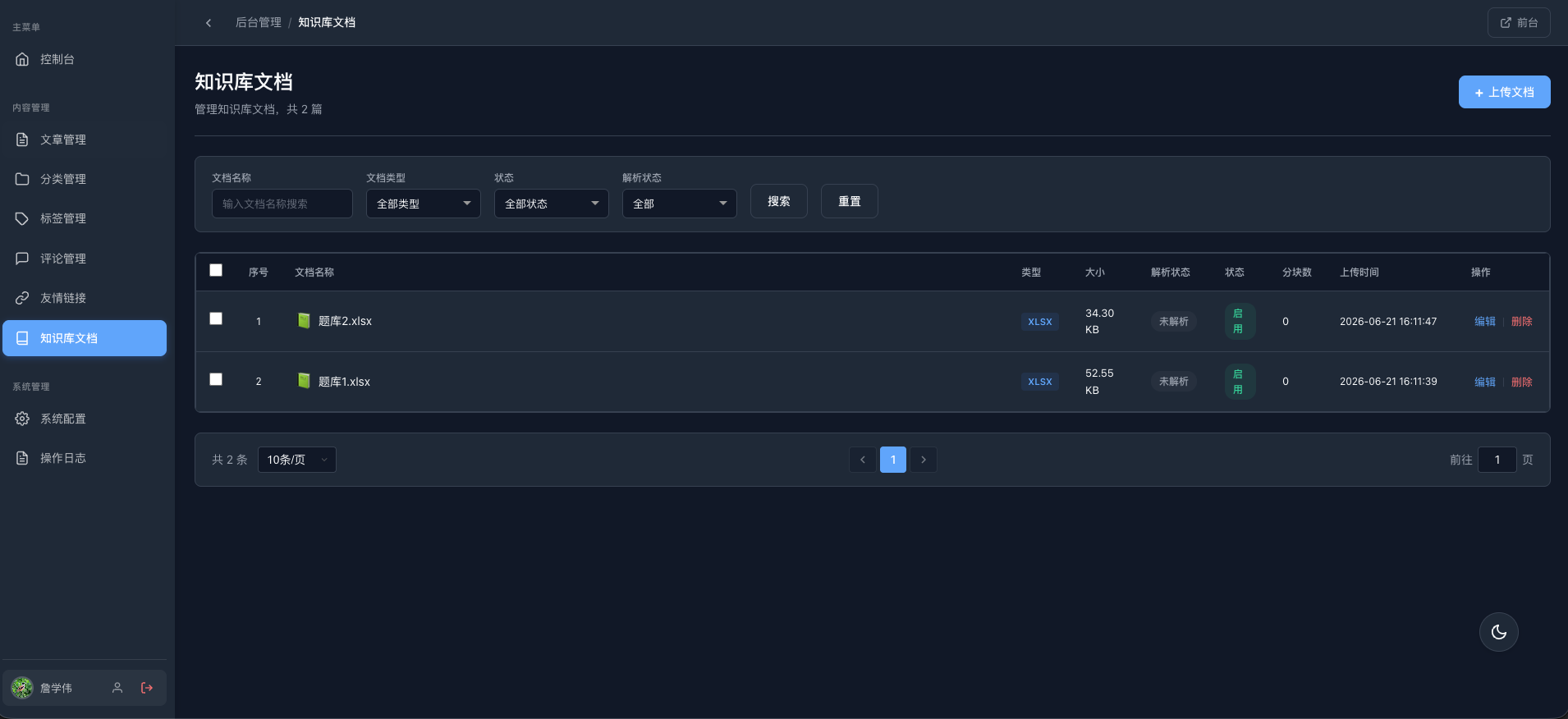
1.后端上传知识库
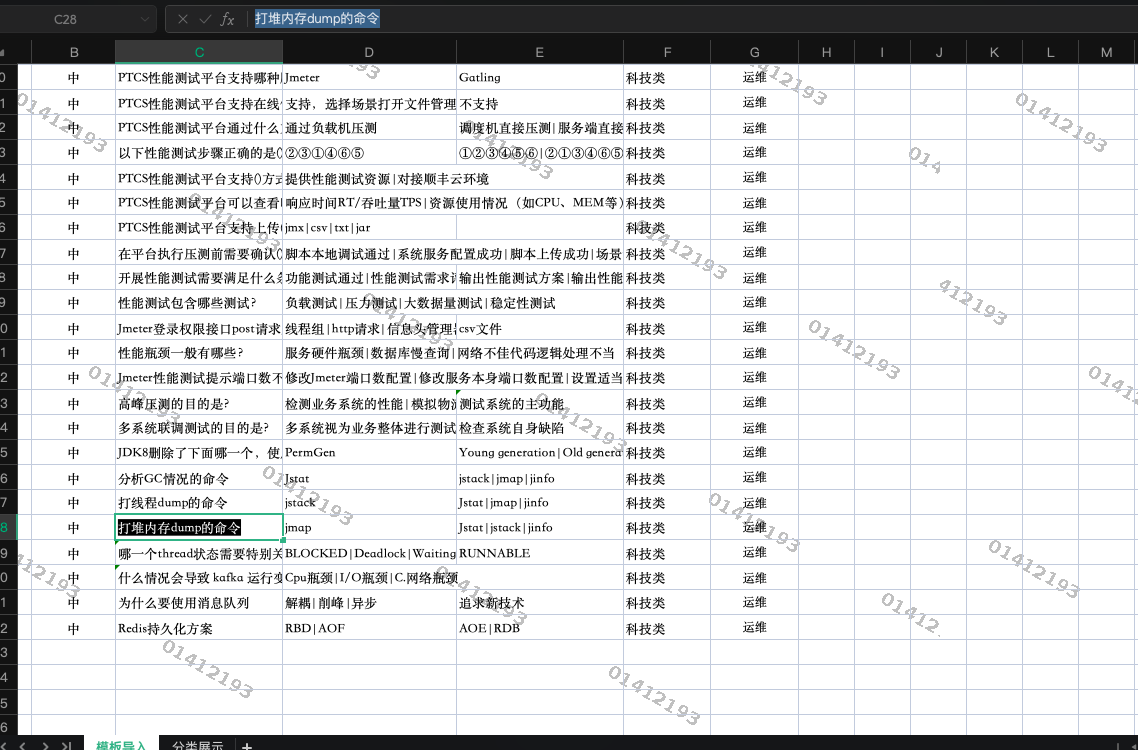
2.前台搜索
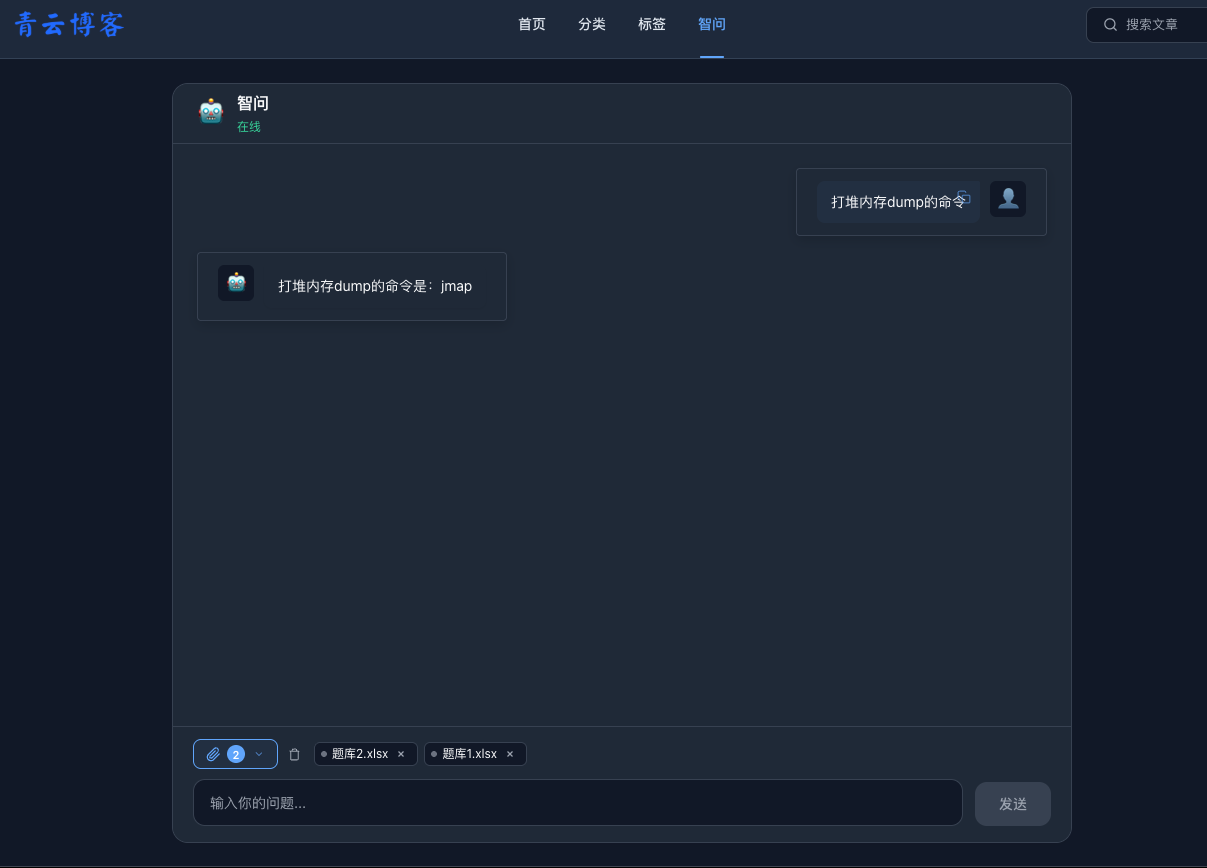
选择所有知识库检索:
选择题库1(搜索无结果,因为这个问题是题库2中的):
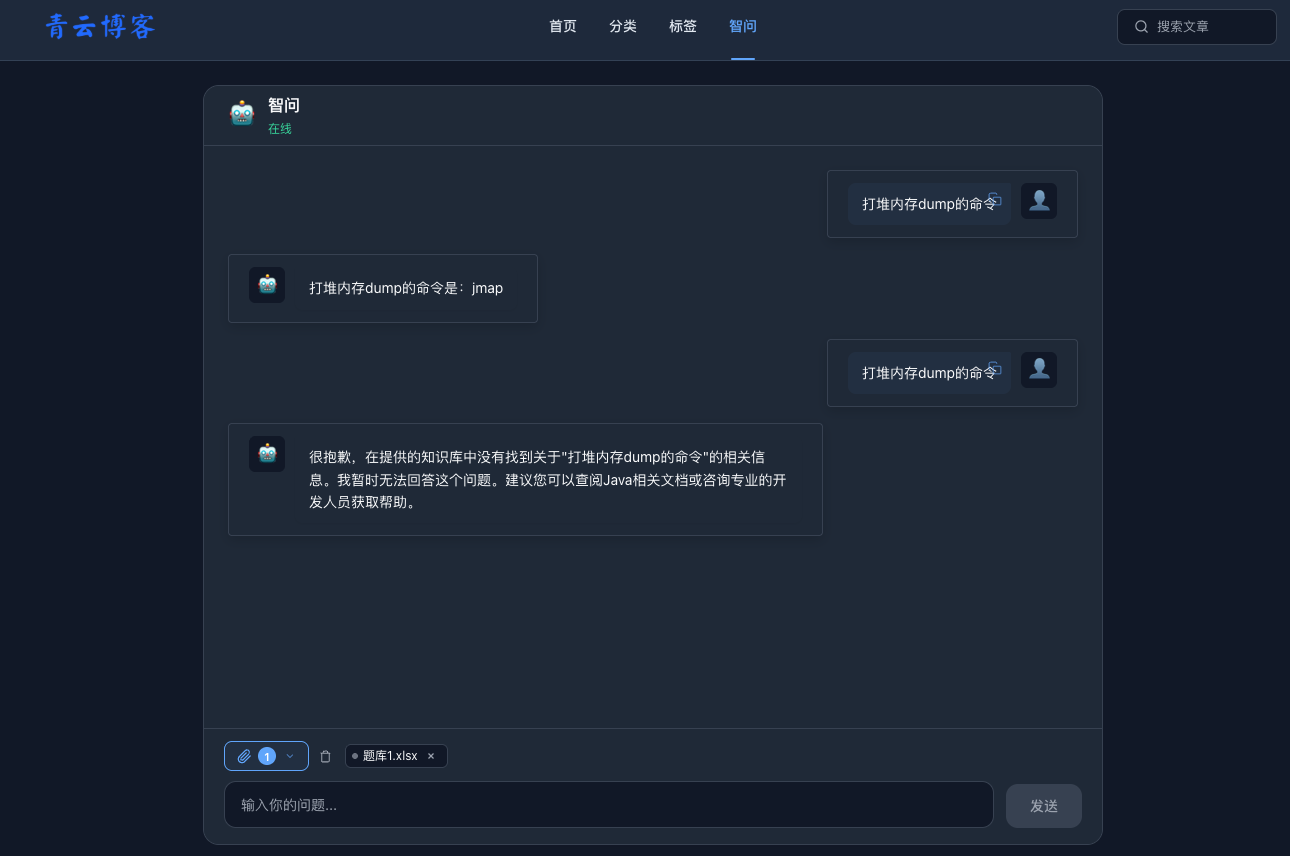
选择题库2: